
An AI Coding and CICD Workflow that get's you there
Disclaimer: This post isn’t about claiming that one tool is better than another. I’m aware that OpenAI offers its own equivalent coding workflow–optimized tools. The comparison between ChatGPT and Cursor is simply made for the purpose to emphasize a starting point from which many people come to the topic under discussion in this post.
The Copy-Paste Workflow
Since ChatGPT has been launched in 2022 it was not long for me till I tried using it to generate code by simply describing the task or problem in natural language. Ever since, people have been starting to explore its capabilities to generate code and the adoption of ChatGPT as coding buddy has grown.
Yet, despite many new tools have emerged, my observations - and from hearing from others even in the engineering field - the “workflow” of copying code from ChatGPT and pasting into an IDE has not really changed for most people.
However, the downsides of the let’s call it “copy- and paste” workflow are obvious:
-
🐌 Very slow: Copying and pasting might under some circumstances still be much faster than typing and figuring out everything yourself with Stack Overflow, but it can be very slow and cumbersome to paste text back and forth between two windows as it breaks the flow
-
🦿 No use of agent mode: It is not possible to enter agent mode. The process of asking how to do something, getting a code snippet as output that you paste into your editor trying to integrate it into your program, trying to compile it - all manually.
-
🪸 Limited context: A third one, and maybe even more important than agent mode, is the fact that always starting with an empty chat is not enough context for getting the right results, especially as soon as complexity increases. The more complex a task is and the more information needs be taken into account, the harder it can be to get everything in. Even though ChatGPT has some memory functionality built in, and file upload is possible the chat UI will give you a hard time sharing relevant content with increasing amount of files, code snippets, etc. Imagine a colleague without memory that always forgets what you discussed yesterday about your common project.

(source: Youtube - Men in Black Neuralyzer Mind Wip)
At some point, you will find it hard to share all relevant infos within a single chat conversation, unable to provide all context needed for the task, maybe having left-over context information that are noise leading to insufficient context, ending up in frustration about the unwanted results. So prompting feels like throwing coins into a slot machine gambling for the right output.
Suggestion for an Alternative
In this one, I’d like to share a simple, unsophisticated workflow that does not require a lot of tooling, that can be easily adopted and seems to work well for a certain type of application development projects. In addition to the coding and development part, it covers the whole chain, meaning from the first line of source code all over to a fully working app deployment on the edge between QA and pre-production stage.
So if you are a developer, operator, or hobby builder with some experience in using VC Code, version control with git, and have been following the copy-paste workflow till today this blog post picks you up in the right spot. 🫵
Area of Use
I initially tried this workflow on a project aimed at building a browser-based web app for a concert booking agency where the users are event managers who book concerts at different venues for specific tour dates. At this point, the general applicability of the approach has to be verified as it has only been tried in my very own single example. However, I believe that it could work for all type of projects where you have mostly CRUD operations combined with a three tier architecture (Web UI, API backend wired to a SQL database). The basic idea comes from the Youtube Tutorial Cursor AI tutorial for beginners where Ras Mic demonstrates his workflow.
The Tool Stack
The only tools I use for the workflow are v0 and Cursor with Claude Sonnet and Vercel hosting the deployment. The free tiers of v0 and Vercel have been sufficient so far for testing the workflow. For Cursor, I have been using the Pro version which is around $20 per month and gives you the option to use Claude Sonnet which is considered the best Coding Model at point in time.
The Workflow
Start with v0
We start with the UI. v0 is optimized for web app and prototype generation. It can do more but we only need it to generate our first click prototype. In my example, I wrote a description of the desired UI design, including two screenshots attached. The screenshots show the tabs of an Excel sheet that event managers are currently using as a workaround solution. They could be photos of paper sketches or Figma designs too. Here is the only prompt needed to let it generate the UI:
“I need an app in which I can add resources that can be booked. The app should be usable for all my team member in our agency. Our agency organizes concerts. Customers usually send a list of date options for an event that could take place in a specific venue (usually one to three options). So these list with options need to be feed into the app so that data can get viewed the matrix view (first screenshot I sent). So a venue is a stadium or a music hall for example. And the event is a concert. Also we have a database venues (second screenshot). Could you do that? Just start with the UI, no database needed for now”
Not saying that you should only need one prompt but I received better results refining the first prompt and trying again instead of correcting the first version of the UI Design with subsequent prompts.
Once you’re satisfied with your click prototype, export the source code as a .zip file. Don’t worry if buttons and navigation aren’t working yet - we’ll handle that in the next step.
Switch over to Cursor
Open Cursor and import the zipped click prototype similar to how you would import a project in VS-Code.
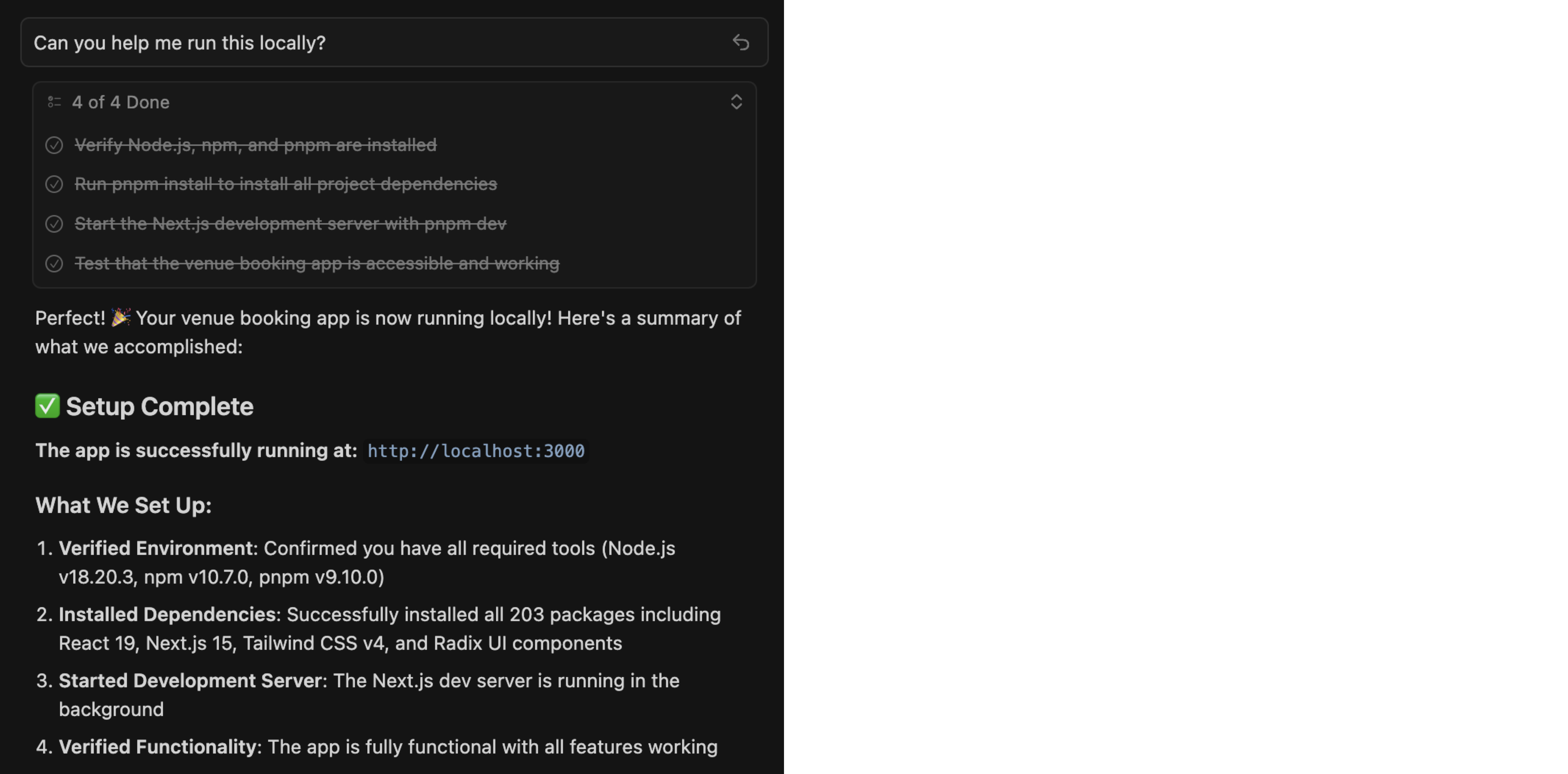
Now use the chat window to ask Cursor if it can compile and run the project on your local machine. I used the following prompt:
Can you help me run this locally?
Make sure you have it in “agent mode” and chosen “Claude Sonnet” as model. Cursor should now attempt to install the dependencies of the project, even install node package manager on your local machine in case it is not installed yet.
Within Cursor you can give the coding agent access to your your terminal. This might feel a little bit scary but also makes it really powerful as it will have access to the command line tools. It might feel scary, but by default it won’t fire of commands without you approving each one in advance.
All it needs for you is to review and allow the install commands which is for good safety reasons. If the copy-paste workflow has been your routine so far you are likely to feel sightly blown away by the agents capabilities already - at least, that’s how I felt.
After it’s done it gives you a brief summary of the completed setup including a link to observe the result in the browser.
Generate Data Model and Application Backend
Now we’re adding functionality — wiring up the click prototype to an application backend and a data model going into a database. Here the main prompt to do that:
“ok, this looks really good. The Click Dummy UI works and looks nice in the browser. thanks. As you might have seen it is supposed to be an app in which I can add resources that can be booked. The app should be usable for all my team member in our agency. Our agency organizes concerts. Customers usually send a list of date options for an event that could take place in a specific venue (usually one to three options). So these lists with options need to be fed into the app so that data can get viewed the matrix view (screenshot I sent).
So a venue is a stadium or a music hall for example. And the event is a concert. Also we have a database with venues. Could you suggest a plan about the tech stack first? Could you now continue wiring up the UI to the logic, setting up the core application. And set up the database schema and create the main components, maybe SQLite + Prisma.”
Notice the “suggest a plan” part in this one. You can switch to ‘plan mode’ to signal a larger, multi-step task that requires deeper thinking before any actual coding begins.
In my case, it suggested a Node.js API (the application layer) with a Postgres for data storage. Once satisfied with the plan you can let the agent execute the plan.
It creates the API and the database, laying the groundwork for connecting the UI to the API endpoints and the API to the database. I’m highlighting “laying the groundwork” because at that stage, many buttons and toggles were still not wired up—mainly because their underlying logic hadn’t been defined yet. So some follow-up prompts where need to point the agent at everything missing after the first query. Here’s a selection of some follow-up prompts that where needed in my case:
I just created an event but cannot see it in the matrix. what did go wrong?
I think the activity tracking feed is still only filled with dummy data. I just created an event. That should actually show up. While wiring the logic to the activity tracking feed just keep the look and feel as close as possible to how it is right now.
I just adjust the a new screenshot. The button to the “Team Activity Feed” always shows a 3. Probably some dummy data. Can you make a suggestion how to fix it?
Tip 1: At this point, the main concept and design should be well-defined in terms of what the app’s purpose is and the major user journeys should be established and carved out already. If at this point you realize a conceptual issue or that a major change is required, it may be best to stop and restart from v0 or even go back to your original Figma, Excel Sheet, or paper prototype.
Tip 2: Start over early if you don’t get the expected solution or progress seems to be getting stuck. In my experience, starting over as soon as the result isn’t what you expected is better than trying to correct it or discussing what you like or don’t like about the last outcome. However, it really depends.
Have a Local Deployment Environment
Like in a classic coding project at some point you need to setup different environments of your app. In an AI-assisted coding project, those are even more important. There are a different aspects why:
For the agent to reach its full potential, it needs access to a live environment of your application, a running deployment it can mess around with. This allows the agent to receive direct feedback on its own changes from the environment. The agent’s ability to autonomously query the API, retrieve data from the database, analyze the results, and adjust the code accordingly — combined with the knowledge encoded in its pre-trained model — enables it to enter an iterative feedback loop that until the desired output satisfies the objective. Therefore, giving access to the environment is the most valuable form of context - way more valuable than the copy-paste-workflow can ever be and from my perspective the main reason why this approach in Cursor works so fine.
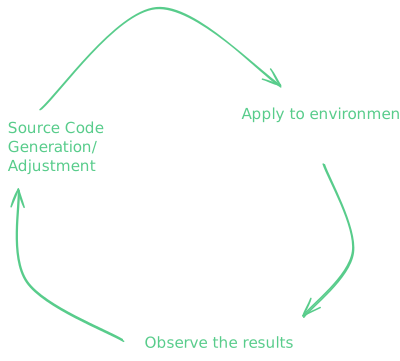
An additional aspect why separate environments are critical is the safety net, letting the AI work on an uncritical environment serves as protection layer against unintended agent behavior. Sometimes, the agent applies changes to the environment that are hard to reproduce and revert. To avoid frustration, best to have an environment that can be re-deployed easily in case the agent burns it.
Hence, at minimum, you should have one development environment in addition to your production environment. Suggestion for a cost optimized approach to get started: Have a local deployment (building and testing your features) and a remote deployment (prod) where the already working code changes come to live in front of the users! In my case “prod” was used as stage mainly for UAT purposes and receiving feedback from future users.
While working on your app, bear in mind that you need to maintain the ability to jump back to previous versions. In general, we have two independent artifacts that are constantly changing: one is the source code, including configuration files (everything in the editor that is files with text), and the other is the currently running environment, including its state (mainly the database with all current records, dummy/synthetic data, etc.). Both need to be maintained during your development activities, but most importantly during changes applied to “prod”. In my experience, the coding agent is very good at the code/config part but lacks awareness for impact to the system’s state.
To maintain the ability to always recover the previous satisfying version, create a git commit marking milestones of a working app version. This way, you can always “git reset –hard” and start a new Cursor chat window with a fresh, unpolluted context being the last working code base.
For maintaining and recovering the system state, it requires more than just creating git commits. I’ll cover this in the next section.
Deploy to “Prod”
This is where vercel comes into play. I started a new chat conversation:
Ok, we just published this app to a private github repo.From there we want to publish it to vercel. Note it also needs a database. Lets try to get a free tier or as cheap as possible. Focus is just to have a usable poc.
As we’ve learned during the process where the coding agent helped us to build and run the UI, it can utilize your local Command Line Interface (CLI) tools. In case of vercel CLI and gh CLI this workbench extends to the cloud backends of vercel and github which makes it even more powerful. So, the Cursor agent even executes the task of deploying the application to the remote infrastructure via using vercel --prod command.
That successfully deployed the application — the UI loaded fine. Then I tested the app by trying to log in. It didn’t work.
ok, the UI login shows up but I get “Internal server error” after login attempt with username password
Some initial setup was required in the Vercel browser console: creating the database, choosing a “Hobby” Plan, and getting environment variables (database credentials, etc.) to paste into the local .env.production file. The Cursor agent then seeded the database using the same migration script it had built during development phase.
Finally, I was able to log in. I shared the URL with my test users — ready to collect my first feedback.
Referring back to end of the previous section, I’ve observed that the coding agent has struggled to effectively manage this stage. It seems like it generally struggles with distinguishing between different live environments (in my case local dev and remote prod) and it lacks awareness of the correct order of applying future feature changes (e.g., first extending the data model with a new column before adjusting the API). However this would be critical to minimize user friction and avoid downtime. I mitigated this by splitting deployment jobs into smaller task formulation prompts very narrow.
Summary, Future Work, and Outlook
Since I haven’t written a single line of code myself, this could probably be described as “vibe coding”.
From a time-savings perspective, the eight hours it took to build the app would likely have taken me at least a full week without an AI coding assistant That would be 7 times faster.
For me whose knowledge and background lies primarily in the infrastructure and deployment, this AI-aided coding workflow opens a way towards full stack engineering. However, I can’t yet assess the security quality of the frontend login or the overall UI code quality. In order to make this a production ready, I would need to dig in learn and probably and likely rewrite significant parts of the application. But that takes time.
So is it really a time saver?
Probably not in the case of my booking agency app — unless the application has a very limited user base and runs in a private, isolated trusted network where security issues can be contained.
Worth noticing is that I did not reach the so called “AI death spiral”, something I heart or read before which can be defined asa state where the AI is not able to improve/developer further without breaking other things leading you to go down the spiral fixing it yourself.
Overall, it was a good and enjoyable experience. Many questions remain, but I’ll definitely continue using and integrating this workflow further.
Refs:
- Basis of this blog post Youtube Tutorial - Cursor AI tutorial for beginners
- Many metaphors are not taken directly but my be inspired from Fireship
- Youtube - YC Root Access: Advanced Context Engineering for Agents
- 12-Factor Agents: Patterns of reliable LLM applications — Dex Horthy, HumanLayer